Here is a conversation that happens in maintenance teams all over the world, more often than most people would care to admit.
Someone raises the idea that the CMMS isn’t working as well as it should. Data quality is poor. Reports aren’t trusted. Planners spend more time fighting the system than using it. The suggestion that follows is almost always the same: maybe it’s time for a new one.
And so begins the long, expensive, disruptive process of evaluating platforms, building a business case, migrating data, retraining teams, and hoping that this time things will be different.
Sometimes they are. Often they aren’t. Because the uncomfortable truth behind most underperforming CMMS environments isn’t the software. It’s the discipline — or lack of it — surrounding how the system is used.
The 2026 State of Maintenance Planning and CMMS Industry Report found that only 18% of respondents identified CMMS limitations as a barrier to effective planning. The leading barriers were reactive culture, coordination challenges, and poor work request quality. In other words, the people and processes around the system, not the system itself.
This matters because it reframes the problem entirely. If your CMMS isn’t delivering what it should, the answer is rarely to replace it. The answer is almost always to use it better.
Here is how to do that — without a full system overhaul, a major budget allocation, or starting from scratch.
Start With an Honest Assessment
Before changing anything, it’s worth understanding clearly what is and isn’t working in your current environment. This sounds obvious, but most organisations skip it. They know things aren’t right, but they’ve never taken a structured look at exactly where the gaps are.
A useful starting point is to ask a few honest questions across the key areas of how the system is used.
Is the asset register accurate and up to date? Are assets structured in a logical hierarchy that reflects how the plant actually operates? Are naming conventions consistent, or has the system accumulated years of different people’s different approaches to the same problem?
Are work orders being raised with enough information to plan and execute jobs effectively? Or are they arriving as two-word descriptions that tell a planner almost nothing they need?
Are jobs being closed out properly? Is failure mode data being captured? Are parts usage and actual labour hours being recorded consistently? Or are work orders being closed with minimal detail — “completed,” “repaired,” “done” — that leaves the maintenance history effectively empty?
Are job plans and task lists being built and reused? Or is every recurring job being planned from scratch each time because the library hasn’t been built or isn’t trusted?
The answers to these questions will tell you more about the health of your CMMS than any platform evaluation. They’ll also tell you where to focus first.
Clean the Foundation Before Building on It
Asset data is the foundation on which everything else in a CMMS sits. Job plans are linked to assets. Preventive maintenance schedules are attached to assets. Failure history is recorded against assets. Spare parts are associated with assets. If the asset register is inaccurate, incomplete, or inconsistently structured, every downstream function is compromised.
The good news is that asset data doesn’t need to be perfect across the entire site to start delivering value. A practical approach is to focus first on your most critical assets — the equipment whose failure has the most significant operational, safety, or cost impact — and ensure those records are clean, complete, and correctly structured.
This means accurate descriptions and naming conventions, correct location and hierarchy information, associated documentation where it exists, and links to relevant spare parts and job plans. Once the critical asset register is solid, the approach can be extended progressively across the rest of the site.
This is slower than a full data cleanse, but it’s more realistic, it delivers faster visible improvement, and it doesn’t require a project budget to get started.
Build and Protect the Job Plan Library
If there is a single area of CMMS capability that most planning functions underinvest in, it is the job plan library. A well-built library of standard job plans for recurring work is one of the most valuable long-term assets a planning function can develop — and one of the most consistently neglected.
The reason is usually time. Building a proper job plan takes longer than raising a basic work order. In a busy, reactive environment, the path of least resistance is to raise the work order with minimal detail and move on. The job gets done. The plan gets lost. And next time the same job comes around, the process repeats.
The compounding cost of this approach is significant. Every job that runs without a standard plan is a job that depends entirely on the technician’s individual knowledge and memory. Scope varies. Quality varies. Time estimates are never accurate. And the failure history that should be building up in the system stays empty because there was no structured plan to close against.
Investing time in building job plans — even starting with just the top 20 or 30 most frequently recurring jobs — begins to shift this pattern. Plan reuse rates improve. Technician productivity improves. Estimates become more accurate. And the CMMS starts to function as the planning engine it was designed to be, rather than an expensive work order register.
For planners building a job plan library for the first time, the place to start is the PM schedule. These are the jobs that recur most predictably and benefit most directly from standardised, well-prepared plans.
The Maintenance Planners Playbook covers job plan construction in depth — including what a high-quality plan contains and how to build a library that technicians actually trust and use.
Get Serious About Work Order Close-Out
Poor work order close-out is perhaps the most widespread and damaging CMMS discipline failure in maintenance organisations. It is also one of the most consistently overlooked, because the impact isn’t immediate or visible. It accumulates quietly over time until the system’s maintenance history is so thin and unreliable that nobody uses it for anything meaningful.
What does poor close-out actually look like? Jobs marked complete with no description of what was done. Failure codes left blank or set to a default. Parts usage not recorded. Actual labour hours either missing or copied from the estimate without review. Completion notes that say “repaired” or “checked and OK” and nothing else.
Each individual instance seems minor. Across hundreds or thousands of work orders a year, the cumulative effect is a CMMS that cannot answer the most basic questions a planner needs to ask. What’s the failure history on this asset? How long does this job actually take? Which spare parts were used and how often? What’s causing this equipment to fail repeatedly?
Without good close-out data, these questions can’t be answered reliably. And without answers, improvement is largely guesswork.
Improving close-out quality doesn’t require a system change — it requires a behavioural one. That means setting clear minimum standards for what a closed work order should contain, training technicians on why it matters rather than just telling them to do it, and creating feedback loops that show what happens when data is captured well. Planners who follow up on close-out quality, use the data visibly in their planning decisions, and acknowledge good practice build the culture over time.
It is slow work. But it is the work that transforms a CMMS from an administrative burden into a genuine reliability tool.
Use the System to Drive Planning Discipline — Not Just Record It
One of the most common CMMS failure modes is treating the system as a passive record rather than an active planning tool. Work comes in, gets entered, gets done, gets closed. The system records what happened. And that’s where its role ends.
In a well-functioning planning environment, the CMMS plays a much more active role. The backlog is managed through the system — reviewed regularly, prioritised deliberately, and used to drive the weekly planning cycle. The scheduling function is used to build and publish plans rather than having them managed separately on spreadsheets or whiteboards. PM compliance is tracked against the schedule, and deviations are reviewed and acted on rather than noted and forgotten.
The question to ask of your current environment is: is the CMMS driving what happens, or just recording it after the fact? If the honest answer is the latter, the opportunity isn’t to replace the system — it’s to embed it more deeply into how planning and execution actually operate day to day.
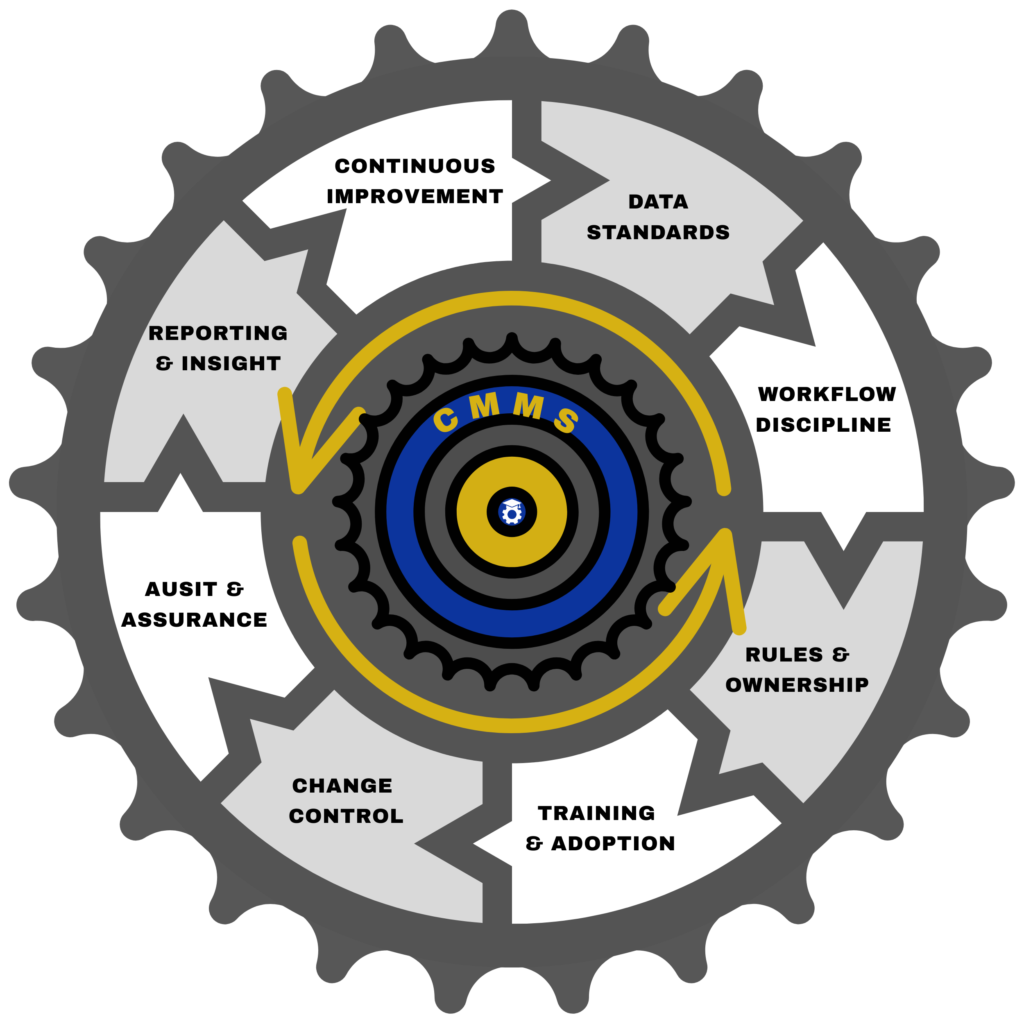
This is also where governance becomes important. A CMMS that is used inconsistently — where some people follow the process and others work around it — will never deliver consistent value regardless of how capable the platform is. The CMMS Governance Flywheel framework covers the disciplines that keep a system functioning reliably over time, from data standards and workflow discipline through to audit practices and continuous improvement. Governance isn’t a one-time configuration task. It’s an ongoing operating discipline.
Invest in Training… and Keep Investing
The 2026 industry survey found that 56% of maintenance planners received minimal or no formal training when they entered the role. It is reasonable to assume that CMMS training follows a similar pattern — a brief introduction at go-live or onboarding, followed by an expectation that users will figure the rest out as they go.
The result is a workforce using a fraction of the system’s capability, developing workarounds for features they don’t know exist, and entering data inconsistently because nobody ever established a clear standard.
CMMS training is not a one-time event. It needs to be role-specific — what a planner needs to know about the system is different from what a technician needs, which is different again from what a maintenance manager needs. It needs to be refreshed when processes change, when new features are adopted, or when recurring data quality issues suggest that the standard isn’t being followed consistently.
This doesn’t need to be a formal training programme with a budget line. Short, focused sessions — ten minutes on how to close a work order properly, a walkthrough of how to read the backlog report, a demonstration of how job plans are accessed on mobile — delivered consistently over time are often more effective than a single comprehensive induction that most people forget within a month.
Know When the System Is Actually the Problem
All of the above assumes that the platform itself is capable of supporting what a planning function needs. In most cases, it is — the problem is how it’s being used. But there are genuine circumstances in which the system has reached the limits of what it can reasonably support.
If critical planning features are entirely absent — a workable scheduling function, a job plan library, meaningful asset hierarchy support, mobile access for technicians — and there is no practical way to configure them, that is a legitimate constraint worth raising.
If the system is so old, poorly supported, or technically unstable that consistent use is genuinely difficult, that is also a reasonable case for investment.
And if the organisation has grown or changed to the point where the system no longer scales to current operational needs, a platform review is appropriate.
The key distinction is between a system that can’t do what you need, and a system that can do what you need but isn’t being used to do it. Most underperforming CMMS environments fall into the second category. Establishing that clearly — before committing to the cost, disruption, and risk of a platform migration — is one of the most valuable things a maintenance planning function can do.
For a structured guide to knowing when it really is time to move on, the Planner HQ article 7 Signs It Is Time To Upgrade Your CMMS covers the indicators worth taking seriously.
The Payoff Is Compounding
The work of improving how an existing CMMS is used is rarely glamorous. It involves cleaning data that has accumulated over years, building job plans that won’t get used until next month, coaching technicians on close-out standards that won’t show up in the metrics for a quarter.
But the return on that work is compounding. A cleaner asset register makes every job easier to plan. A better job plan library makes every recurring job faster to prepare and more reliable to execute. Better close-out data makes every planning decision more informed. Better governance makes every system improvement more durable.
None of this requires a new system. It requires discipline, consistency, and a planning function that understands its role as custodian of the CMMS — not just a user of it.
The best-maintained sites aren’t always the ones with the most advanced platforms. They’re the ones where the people using the system take ownership of how it works, what goes into it, and what comes back out.
That starts with the planner.